
How it works
One clean microphone for every app.
Aurio sits between your microphone and your apps. It removes the background noise on your Mac and hands every app the cleaned signal.

Install & pick your mic
Aurio listens to the microphone you already use and runs quietly in the menu bar.

Noise fades out
Your voice has its noise removed in real time on your Mac, with a strength slider and A/B preview.
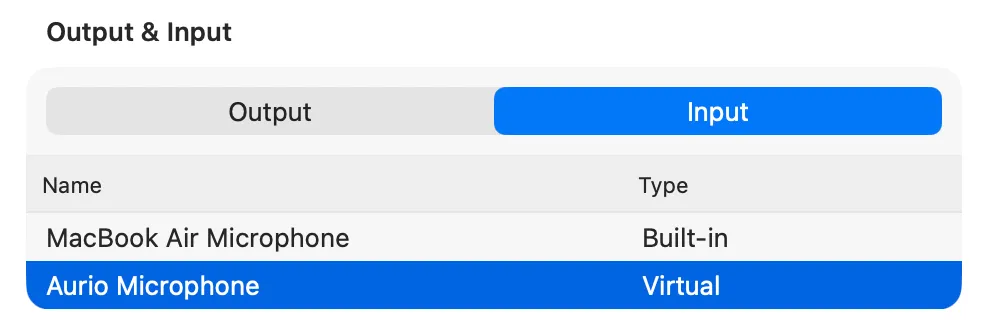
Select “Aurio Microphone”
Choose it in Zoom, Meet, Slack, or any recorder. Each app picks its own microphone, so choose it once in each app you use; after that they all hear the clean signal.
One input, every app
Your Mac just sees another microphone.
Aurio installs itself as a real input device. Pick it in a meeting app, a recorder, anywhere you can choose a microphone, and that app hears the cleaned signal.
Works with
Any app that lets you choose a microphone.
Private by design
- On your MacNoise removal runs on-device. Your microphone audio is never uploaded.
- No accountNothing to sign up for. The trial doesn’t ask for an email.
- Apple-notarizedSigned with a Developer ID and notarized by Apple.
- Crash reports are opt-inOff unless you turn them on, and they never include audio.
What Aurio doesn’t do
Aurio cleans your own microphone. It doesn’t clean other people’s audio on a call, remove echo or take meeting notes, and it can’t fix a recording you have already made. It runs only on Apple silicon Macs, not on Intel Macs or Windows.
Why not just use…
You may already have noise suppression. Here’s the difference.
Want to try the free fixes first? How to remove background noise from your Mac microphone.
macOS Voice Isolation
Free and built in, but it only works in apps that support Mic Modes, and it is either on or off. Aurio is a real microphone, so it works in any app that lets you pick one, and its strength is a slider.
Zoom, Meet or Teams suppression
Each app cleans up its own calls and nothing else. Your recorder, OBS and the next app still hear the room. Aurio cleans the mic once, for every app.
Krisp
Good, and the best known. It needs an account and a subscription, from $96 a year. Aurio needs no account, and $40 buys the app to keep, with a year of updates that renews yearly, or $70 with lifetime updates.
Comparing apps? The best noise cancelling apps for Mac, or what to use instead of NVIDIA Broadcast, which is Windows-only.

Hear yourself, not the room.
Free for 14 days. Then $40 a year, or $70 once for lifetime updates. The app is yours to keep either way.